You copied a Rednote link, opened it in your browser, and saw an error instead of the post you expected. Or perhaps the link opens normally, but a downloader cannot find its videos or photos.
Rednote, also known as Xiaohongshu, uses more than one kind of post link. Some are short URLs that redirect to a longer address, while others include query parameters used by the platform when opening the content.
The cause may be as simple as an incomplete URL, but private access, a deleted post, a failed redirect, or an unsupported page type can produce a similar result. This guide will help you identify where the link fails and choose a suitable fix.
First, Find Out Where the Link Fails
Before changing the URL, check whether it works outside the website or tool that is reporting the problem.
- Copy the complete Rednote link you want to use.
- Open Chrome, Safari, or another current browser.
- Paste the URL into the address bar and open it.
- Check whether the intended post, a sign-in page, or an error appears.
If the post opens in your browser but not in a downloader, the issue is more likely to involve the tool's supported URL formats, media types, or access to the source. If the link also fails in the browser, examine the URL, the post's availability, and any sign-in requirement first.
A Real RedNoteDL Error Example
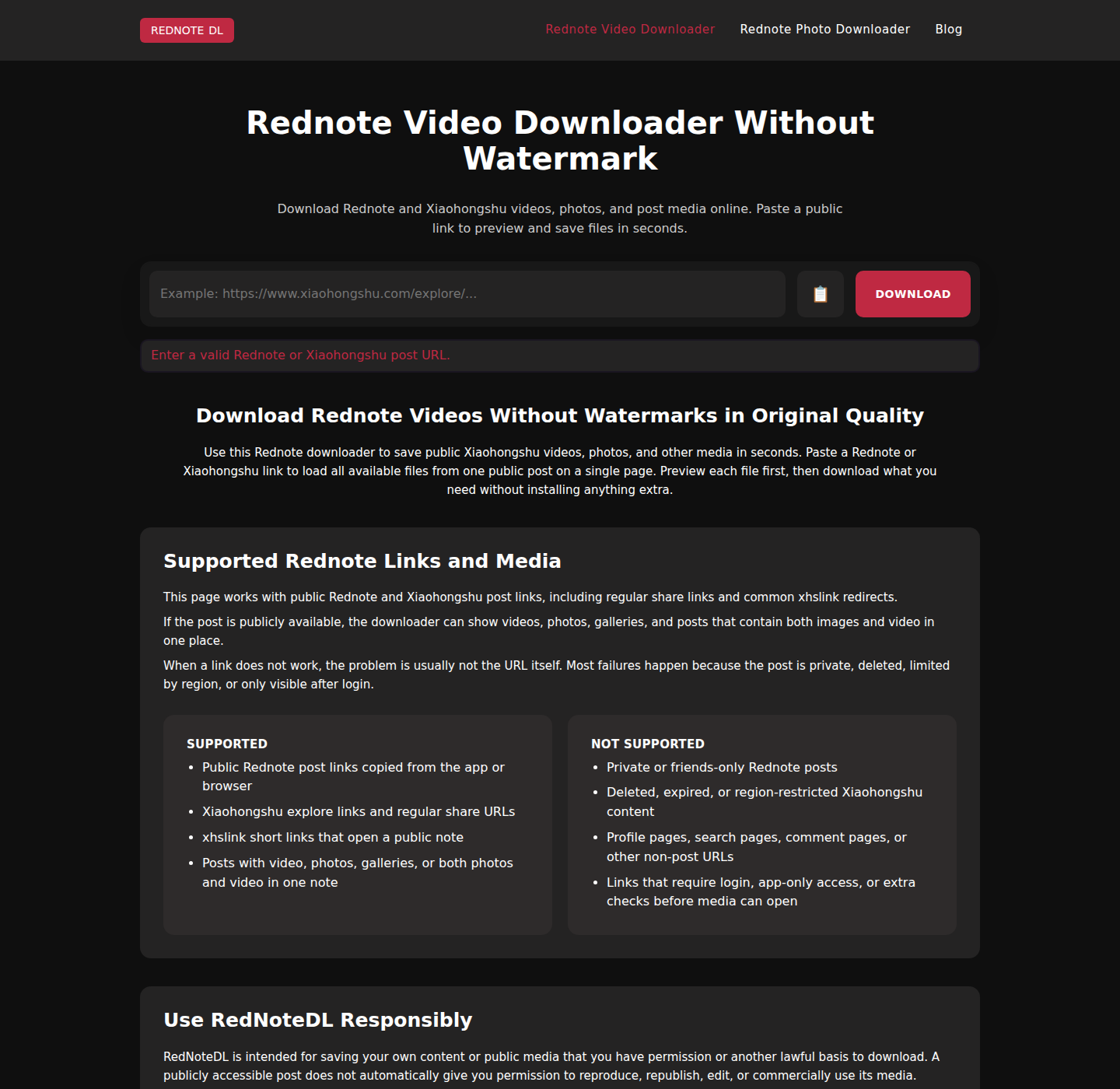
RedNoteDL displays “Enter a valid Rednote or Xiaohongshu post URL.” when the Download button is submitted without a recognizable post URL. The screenshot below was captured from the real English downloader interface after reproducing that validation error.
To fix it, copy the complete URL from an individual public post and paste it into the input field. Do not use a profile, feed, search, comment, or login page. If you are unsure how to get the correct address, follow the link-copying guide below.
1. The Link Is Incomplete or Incorrect
A missing character can be enough to break a Rednote link. Some Xiaohongshu post URLs also contain information after a question mark. For example, a shared address may include an xsec_token parameter.
Not every query parameter is necessarily required in every context, but removing parts of a copied URL makes troubleshooting harder and can prevent the platform or another tool from recognizing it.
How to Fix It
Return to the individual post in the Rednote app, open its sharing actions, and use the available link-copying option. Paste the newly copied link without editing it.
Rednote may copy a short sharing message together with the URL. Make sure you submit the complete web address rather than the surrounding message, and avoid manually shortening the address or deleting its parameters.
2. The Short Link No Longer Works
Rednote posts are often shared through an xhslink.com short URL. That address normally redirects to a longer Xiaohongshu post page.
A short link can fail because its redirect has changed, access is restricted, or the platform is experiencing a temporary problem.
How to Fix It
If the original post still opens in Rednote, copy a fresh link from its sharing actions and test it in a browser.
If someone else sent you the link and you cannot access the post, ask them to share it again. RedNoteDL supports xhslink.com redirects that resolve to a supported public post, but a broken or restricted redirect cannot be repaired by the downloader.
3. The Post Is Private, Restricted, or Deleted
A URL can be correctly formed even when the content behind it is no longer publicly available. The creator may have changed the post's visibility, deleted it, or had it removed. A post may also remain visible to its owner while being unavailable to signed-out visitors.
How to Fix It
Try opening the post in the official Rednote app. If it is your content, confirm that it still exists and review its visibility settings.
If it belongs to someone else, respect the creator's access settings and request permission where appropriate. Editing the URL cannot restore a deleted post or bypass a privacy restriction.
4. Rednote Requires You to Sign In
A link may work in the Rednote app on your phone but not in a desktop browser because the app already has an authenticated session. Depending on the post and access conditions, Xiaohongshu may require a sign-in before it displays the content.
How to Fix It
Open the link in the official Rednote app or on the official Xiaohongshu website. If prompted, sign in only through the platform's official interface.
If the post is available only to signed-in users, a browser-based downloader may not be able to access it.
5. The Downloader Does Not Support the Link
Downloaders do not necessarily recognize the same hosts, page types, or media formats. One tool may accept a full Xiaohongshu post address but reject a short redirect, profile URL, search page, or a media type it does not handle.
RedNoteDL currently accepts public xhslink.com redirects and Xiaohongshu explore or discovery item URLs. A supported-looking address still needs to resolve to an accessible individual post.
https://xhslink.com/…https://www.xiaohongshu.com/explore/…https://www.xiaohongshu.com/discovery/item/…
How to Fix It
First confirm that the post opens in a regular browser. Then make sure you copied an individual post URL and open either RedNoteDL page; both pages display all media the service can retrieve.
If the results contain only photos, the source post may not expose a video. A valid, working link does not guarantee that every file is publicly retrievable.
6. Your Browser or Network Is Causing Problems
Not every failed request means the URL is broken. A temporary connection problem, browser setting, interrupted redirect, or platform outage can prevent a page from loading. Availability can also differ between networks and locations.
How to Fix It
- Refresh the page and open the link again.
- Test the complete link in another current browser.
- Check whether other websites load normally.
- Switch between Wi-Fi and mobile data, if available.
- Try again later if Rednote or Xiaohongshu appears to be temporarily unavailable.
If the same link fails in several browsers and on different networks, the cause is more likely to involve the URL, post, or access rules than your device.
Quick Troubleshooting Checklist
Use this table to match the symptom with the next practical check.
| Problem | What to Try |
|---|---|
| The link opens the wrong page | Copy it again from the individual post |
| A short link does not redirect | Copy or request a fresh sharing link |
| The post opens in the app but not in a browser | Check whether the browser requires sign-in |
| The link works in a browser but not in a downloader | Check the tool's supported hosts, paths, and media types |
| The results contain only photos | The source post may not expose a video file |
| The post is unavailable everywhere | Check whether it was deleted, made private, or restricted |
| The page loads inconsistently | Try another browser or network, then try again later |
Testing the complete link in a regular browser is the most useful first step. Once you know where it fails, you can avoid repeating fixes that do not address the underlying problem.
Frequently Asked Questions
Do Rednote Links Expire?
Some short sharing links or access parameters may stop working over time, but that does not mean every Rednote post URL has a fixed expiration date. If an older link fails, copy a fresh one from the original post when possible.
Why Does My Rednote Link Work on My Phone but Not My Computer?
Your phone may already be signed in to Rednote while your desktop browser is not. Redirect behavior, browser settings, or content restrictions can also differ. Test the complete URL through the official Xiaohongshu website and follow any legitimate sign-in prompt there.
Why Does My Downloader Say the Rednote Link Is Invalid?
The downloader may not recognize the URL format, the copied address may be incomplete, or the page may not be an individual accessible post. Check the link in a browser, then compare it with the tool's supported formats.
Can I Recover a Deleted Rednote Post Using Its Link?
A URL alone generally cannot restore content that has been permanently deleted. For your own post, check your device gallery, cloud storage, backups, or the project files from the app you used to create it.
Final Thoughts
A Rednote link that does not work is not always malformed. The most common explanations are an incomplete URL, a failed short-link redirect, restricted access, an unavailable post, or a downloader that does not support that particular page or media type.
Start by opening the complete address in a regular browser. If the post loads, focus on the downloader and media format. If it does not, confirm that the post still exists, is available to you, and does not require an official sign-in.
When you need a fresh URL, copy it directly from the individual post and leave the address unchanged.