A Rednote post may open normally in the app while a browser-based downloader cannot access its video or photos. One possible reason is the post's visibility setting.
Rednote, also known as Xiaohongshu, provides controls for both account privacy and individual post visibility. These are related but not identical: restricting an account is different from making one post visible only to you.
Understanding that distinction can help you diagnose failed links, protect your own content, and avoid treating a public post as permission to reuse someone else's work.
What Is the Difference Between Public and Private Rednote Posts?
The practical difference is who is allowed to view the content. A public post is intended for a wider audience, although Rednote may still require a login or apply regional and browser restrictions. A restricted post is available only to the audience selected by its creator.
Current Rednote interfaces may offer more than a simple public-or-private switch. Post-level choices reported in 2026 include Public, Mutual friends only, and Only me. The wording and availability can vary by language, region, account, operating system, and app version.
| Feature | Public Post | Restricted Post |
|---|---|---|
| Intended audience | A wider audience | Mutual friends, the creator, or another limited audience |
| Sharing link | Often available | May exist, but does not grant access |
| Signed-out browser access | Sometimes available | Usually unavailable |
| Browser-based downloader | May work when the URL and media are supported | Generally cannot access protected media |
| Permission to reuse | Not automatically granted | Not automatically granted |
Visibility affects whether a downloader can reach a post. It does not determine whether you have permission to reproduce, republish, modify, or commercially use the content.
Rednote Privacy Controls: Account Settings vs Post Visibility
Rednote's account-level privacy control and an individual post's visibility setting solve different problems.
Account-Level Protection
The Australian eSafety Commissioner's current Rednote guide describes an in-app Protection mode that can make a Rednote account private. This is an account-level control, not the same thing as setting one note to Only me.
Because menu layouts change, look in the app's privacy settings rather than relying on a fixed sequence of English labels from an older version.
Post-Level Visibility
For an existing post you own, current interface reports place the visibility control under the post's more-actions menu, commonly represented by three dots. In Chinese versions, the relevant labels may include 权限设置 (Permission settings), 公开 (Public), 仅互关好友可见 (Mutual friends only), and 仅自己可见 (Only me).
When publishing a new post, the same choice may appear as 谁可以看 (Who can view). Do not assume that every account or translated interface will display every option in the same order.
How RedNoteDL Treats Public and Restricted Posts
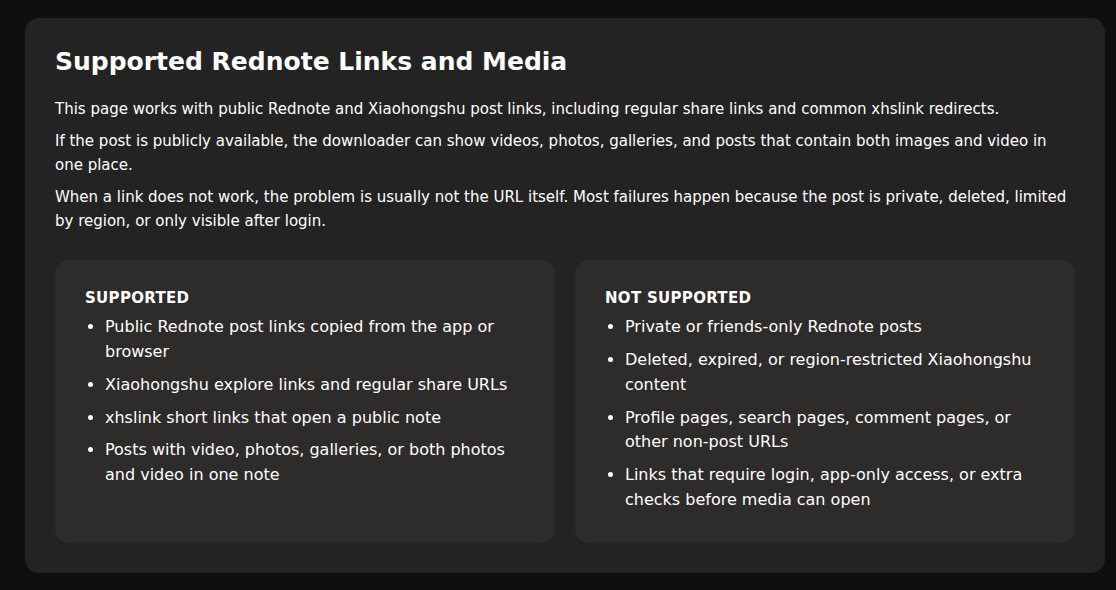
RedNoteDL is designed for supported public post URLs. It does not sign in to your Rednote account and is not intended to bypass Protection mode, friends-only visibility, an Only me setting, or another access control.
The screenshot below was captured from the real English RedNoteDL interface. It shows the site's current support boundary, including private or friends-only posts in the Not Supported column.
Can You Download Public Rednote Videos and Photos?
Some publicly accessible Rednote posts can be saved through an option offered by the app or through a compatible browser-based downloader. Public visibility alone, however, does not guarantee that a download will work.
RedNoteDL shows all video and image files it can retrieve from a supported post on either downloader page. The URL must still resolve correctly, and Rednote may impose a sign-in, regional restriction, temporary check, or technical change that prevents access.
If you are saving your own work, begin with any suitable option offered by Rednote and keep the original files whenever possible. A downloaded version may differ in resolution, compression, or watermark appearance.
- Link format. The tool must recognize the copied post URL or its short-link redirect.
- Media availability. The source must expose the video or image files to the downloader.
- Browser access. A public post may still require a Rednote session or another platform check.
- Temporary limitations. Platform and network changes can interrupt an otherwise valid request.
Can You Download Private or Friends-Only Rednote Posts?
A browser-based downloader generally cannot retrieve media that is available only to the creator, mutual friends, approved followers, or signed-in viewers with the required access.
Receiving a private post's URL does not change its visibility and does not grant permission to view or download it. Avoid services that promise to unlock protected content or ask for your Rednote password.
If the Post Is Yours
Check the post's visibility and available save actions in the official Rednote app. If the post should remain private, use your original files or personal backups instead of changing its audience solely for a downloader.
- Check your phone's Photos or Gallery app.
- Review iCloud Photos, Google Photos, or another backup you use.
- Look in the photo or video editor used to create the post.
- Check an older device or personal backup drive.
If the Post Belongs to Someone Else
Ask the creator for permission and, when appropriate, a copy of the original file. A download tool should not be used to bypass the audience the creator selected.
How to Check Whether Your Rednote Post Is Public
For a post you own, its in-app visibility control is the most reliable place to check. A signed-out browser test is useful as a second check, but it cannot explain every login or regional restriction.
- Open your profile in the official Rednote app and select the individual post.
- Open the post's more-actions menu, usually shown with three dots.
- Look for Permission settings, Who can view, or the equivalent label in your app language.
- Review whether the post is Public, Mutual friends only, Only me, or another audience offered to your account.
- If appropriate, copy the post link and test it in a separate browser session where you are not signed in.
If a browser asks you to sign in, that does not automatically mean the post is private. It only confirms that the post was not accessible in that particular signed-out session.
Why Will a Public Rednote Post Not Download?
Even a genuinely public post can fail for reasons unrelated to visibility, including a broken short-link redirect, an unsupported page, a login requirement, a regional check, or a temporary platform problem.
Start by opening the complete URL in a current browser. If the post opens there, use the dedicated troubleshooting guide to check the URL format and downloader response instead of changing the post's privacy setting.
Does a Public Rednote Post Mean It Is Free to Use?
No. Publicly viewable does not mean free of copyright, privacy, publicity, music, or other rights. It also does not automatically permit reposting, editing, advertising use, or commercial distribution.
Before reusing media, consider whether you created it, whether the relevant rights holder has granted permission, whether your intended use is allowed by applicable law and platform rules, and whether the post contains third-party music, images, or other protected material.
Personal saving, redistribution, and commercial use can involve different legal considerations. When permission is required and you are unsure whether you have it, ask the creator or rights holder before reusing the content.
Frequently Asked Questions
Can I Download Rednote Videos Without an Account?
Some public videos may be accessible without signing in, depending on the post and Rednote's current browser requirements. Downloader support also depends on the URL and media format.
Can I Download My Own Only Me Photos?
A public-link downloader will generally not have access to an Only me post. Use Rednote's available in-app actions or recover the originals from your device, editor, or backups.
Does Making a Restricted Post Public Guarantee a Download?
No. Wider visibility may make the post reachable, but the URL, media type, browser access, and platform restrictions must still be supported. Making a post public also exposes it to a wider audience, so do not change its visibility casually.
Can I Share a Link to a Restricted Post?
The app may provide a sharing link, but possession of that link does not override the selected audience. The recipient still needs whatever access Rednote requires.
Sources and Interface Note
Rednote can change menu names and available audiences by app version, language, region, account, and operating system. This article therefore distinguishes verified concepts from labels that may not appear identically on every device.
The account-level Protection mode description was checked against the Australian eSafety Commissioner's Rednote guide. Post-level labels were cross-checked against a May 2026 visibility test covering public, mutual-friends-only, and only-me notes, alongside Rednote's official privacy information and current store listings. Sources were reviewed on October 19, 2026.
Final Thoughts
Public, mutual-friends-only, and Only me posts do not provide the same level of access. Account-level Protection mode is another separate control that can affect who sees an account's content.
RedNoteDL can work with supported public post links, but it is not designed to bypass privacy settings, login requirements, or other access controls. If you are saving your own restricted content, use the official app and your original backups whenever possible.
And before saving or reusing someone else's photos or videos, make sure you have the appropriate rights or permission.